
SkyCrown Casino App for Android and iOS

The SkyCrown Casino App runs through the mobile browser — no App Store or Google Play download is required. Open a SkyCrown account once and the app uses the same login. Technically this is a PWA (Progressive Web App): it installs directly from the site, opens like a native app and supports push notifications. Throughout this page, it is referred to simply as the app or mobile version. The complete catalogue of 7,000+ games is accessible from the same account used on desktop, with deposits via Apple Pay, card and cryptocurrency available in the same session.
Key Details for SkyCrown Casino App
| Feature | Detail |
|---|---|
| Solution type | Mobile browser / PWA — no download required |
| Platforms | iOS (Safari) · Android (Chrome) |
| Games on mobile | 7,000+ — full catalogue |
| Registration | Available in mobile browser |
| Deposit methods | Apple Pay, Visa, Mastercard, MiFinity, crypto |
| Min deposit via mobile | AU$30 (fiat) |
| Live chat support | Available in mobile browser |
| Account management | Deposits, withdrawals, bonus activation |
The mobile version covers the same functionality as desktop — there is no reduced feature set for mobile users.
Play All Your Favourite Games on Mobile
The mobile browser version gives access to the full game catalogue: pokies, live dealer tables, crash games and instant titles. The lobby structure is identical to desktop — Top, Hot, New, Sky Picks, Jackpots, Bonus Buy and Live Casino tabs are all present. Demo mode works on mobile for punters who want to try a pokie before playing with real money.
Pragmatic Play Live’s 508 live tables are accessible on mobile in the same format as desktop — Blackjack, Roulette, Baccarat, Card Games and Dice Duel. Crash titles including JetX, Aviator and Plinko load through the browser without any additional setup. The HTML5 format used across all 7,000+ titles means no game requires a plugin or separate download.
Account management functions fully in the mobile browser: deposits, withdrawal requests, bonus activation, wagering progress tracking and support access are all available without switching to a desktop session.
How to Install the App on iOS Devices
The install process on iPhone works through Safari without visiting the App Store:
- Open Safari on your iPhone and navigate to SkyCrown Casino
- Tap the Share icon at the bottom of the screen (the box with an arrow pointing up)
- Scroll down in the share menu and tap “Add to Home Screen”
- Edit the name if preferred, then tap “Add” — the SkyCrown icon appears on your home screen
- Tap the icon to open the mobile version directly — it loads without the Safari address bar, in full-screen mode
- Log in with your existing credentials or register a new account from the mobile interface
The install creates a shortcut that behaves identically to a native app icon. Push notifications can be enabled through the browser settings once the site is added to the home screen.
How to Get the App on Your Android
On Android, the install prompt appears automatically in Chrome after the site loads:
- Open Chrome on your Android device and go to SkyCrown Casino
- Chrome displays an “Add to Home Screen” banner at the bottom of the screen — tap it
- If the banner does not appear, tap the three-dot menu in the top-right corner and select “Add to Home Screen”
- Confirm by tapping “Add” in the prompt — the SkyCrown icon appears on your home screen
- Open the app from the home screen — it loads in full-screen mode without the browser bar
- Log in or complete registration directly in the mobile interface
Android users can also enable push notifications through the browser notification prompt that appears on the first visit.
Simple Guide to Registering on Mobile
New accounts can be created directly in the mobile browser — no desktop visit required:
- Open the SkyCrown Casino app on your phone and tap “Sign Up”
- Enter your email address, create a password, and select Australia as country and AUD as currency
- Confirm you are 18+ and accept the Terms & Conditions → tap “Sign Up”
- Check your inbox for the confirmation email and tap the verification link
- Complete your profile — full name, date of birth, residential address and phone number
- Make your first deposit using Apple Pay, card or another available method (min. AU$30) → enter promo code CLASSY at the deposit screen to activate the 120% welcome bonus up to AU$1,200 + 125 free spins
The full welcome bonus offer is available through the mobile registration flow — there is no mobile-specific bonus, but all four deposit steps of the welcome package are accessible in the app.
Payments on the SkyCrown Casino App
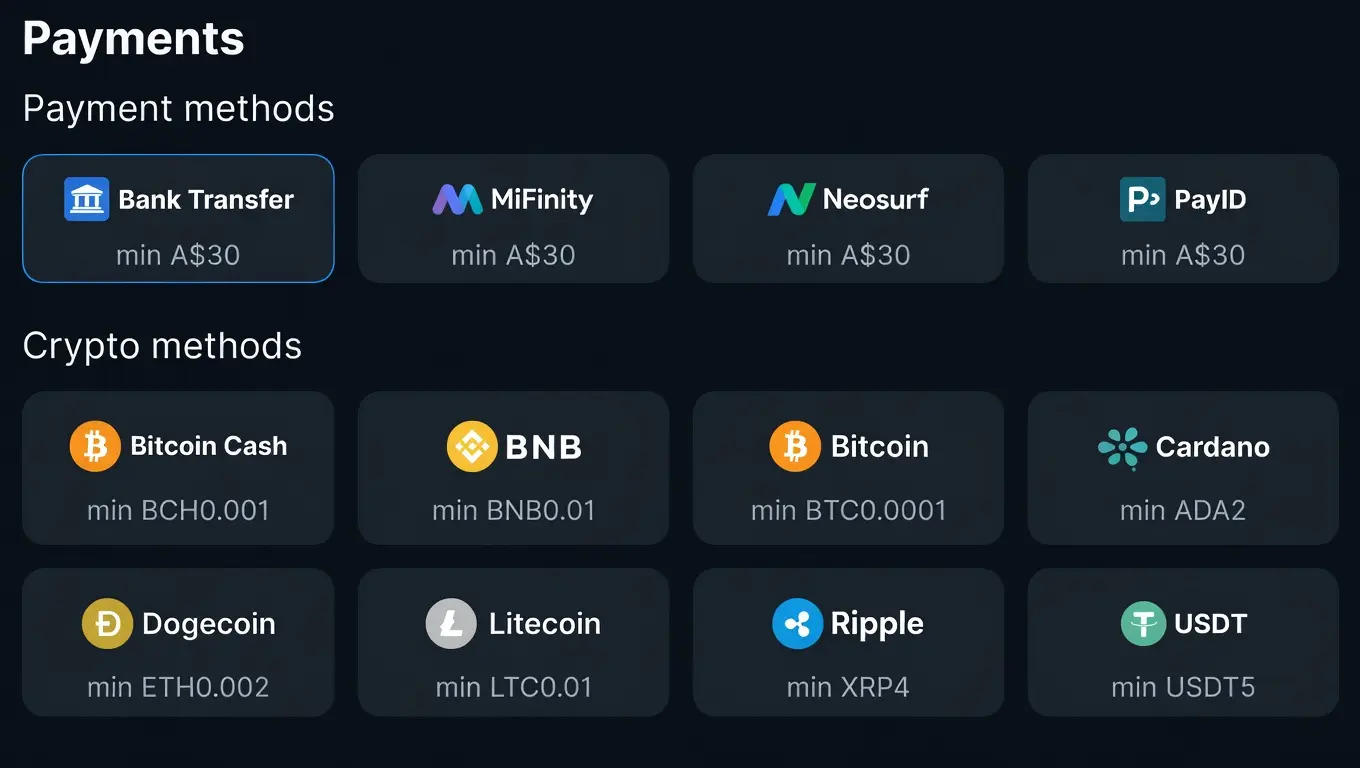
Apple Pay is available for deposits on iOS through the mobile browser — the minimum deposit is AU$30 with a maximum of AU$1,500 per transaction, processed instantly. Card deposits via Visa, Mastercard and Maestro work identically on mobile and desktop. MiFinity e-wallet deposits are accessible through the mobile browser as well.
Cryptocurrency deposits are available on mobile with no upper limit. BTC, ETH, USDT, LTC and seven other cryptocurrencies process through CoinsPaid at real-time Coinbase Converter rates. The minimum crypto deposit is equivalent to €20.
| Method | Min Deposit | Mobile Available | Processing |
|---|---|---|---|
| Apple Pay | AU$30 | iOS Safari | Instant |
| Visa / Mastercard | AU$30 | iOS + Android | Instant |
| MiFinity | AU$30 | iOS + Android | Instant |
| Bitcoin / Ethereum | €20 eq. | iOS + Android | Instant |
| USDT | €20 eq. | iOS + Android | Instant |
Withdrawals are requested through the same cashier interface on mobile. The daily withdrawal limit is AU$7,500. Processing takes up to 72 hours for standard accounts; verified accounts can receive funds in as little as 15 minutes. Document verification must be completed before the first withdrawal — this is initiated through the account section on mobile.
App Notifications and Account Settings
Push notifications in the SkyCrown Casino mobile app cover transaction confirmations, bonus credits and promotional alerts. Notifications are enabled through the browser’s notification settings — Chrome on Android and Safari on iOS both support them once the site is added to the home screen.
Session management, deposit and wagering limits are accessible from the account section in the mobile browser. Responsible gambling tools — deposit limits, session limits, cooling-off periods and self-exclusion — are available in the same location as on desktop.
Final Points
The SkyCrown Casino App delivers the full desktop experience through a mobile browser — 7,000+ games, Apple Pay deposits, account management and 24/7 live chat all work without a native download. The install process takes under a minute on both iOS and Android. There is no reduced catalogue or feature restriction for mobile users. Punters who primarily play pokies on their phones can complete registration, claim the welcome bonus , make deposits and request withdrawals entirely within the mobile interface.
Common Questions About Using the App
Does casino have a native app in the App Store or Google Play?
There is no native app available in the App Store or Google Play. The SkyCrown Casino App runs through the mobile browser as a PWA (Progressive Web App). It installs directly from skycrown.com via the “Add to Home Screen” option in Safari (iOS) or Chrome (Android). Once installed, it opens in full-screen mode from the home screen and functions like a native app.
How do I install the casino app on my iPhone?
Open skycrown.com in Safari, tap the Share icon, select “Add to Home Screen”, then tap “Add”. The SkyCrown icon appears on your home screen. Tapping it opens the SkyCrown Casino App in full-screen mode. The process takes under a minute and does not require an Apple ID or App Store download.
What games are available on the SkyCrown Casino mobile version?
The complete catalogue of 7,000+ games is available on mobile — pokies, live dealer tables, crash games and instant titles. Pragmatic Play Live’s 508 live tables are accessible, along with crash titles including JetX, Aviator and Plinko. The full lobby structure — including Bonus Buy, Jackpots and Sky Picks tabs — is present in the mobile browser. Demo mode is also available for pokies on mobile.
Can I deposit with Apple Pay through the SkyCrown Casino app?
Yes. Apple Pay deposits are available through the iOS Safari mobile browser with a minimum of AU$30 and a maximum of AU$1,500 per transaction. Deposits are processed instantly. Apple Pay is available for deposit only — withdrawals use card or bank transfer methods.
Can I register a new account through the mobile app?
Yes. Registration is fully available through the SkyCrown Casino App on both iOS and Android. The process follows the same steps as desktop: enter email and password, select Australia and AUD, confirm age, verify email and complete the profile. The welcome package — up to AU$8,000 + 400 free spins across four deposits — is accessible immediately after registering through the mobile interface.
Are there any features missing from the mobile version compared to desktop?
No features are removed on mobile. The full game catalogue, all payment methods, bonus activation, wagering progress tracking, account verification and live chat support are all available through the mobile browser. The experience mirrors the desktop version without a reduced feature set.
What is the minimum deposit through the SkyCrown Casino mobile app?
The minimum deposit is AU$30 for card and e-wallet methods including Apple Pay, Visa, Mastercard and MiFinity. Cryptocurrency deposits require a minimum equivalent to €20. All deposit methods available on desktop are accessible through the mobile browser, and all process instantly.